One dashboard
Every repo, graded.
Sign in with GitHub and sync. Each repo gets a 0–100 health score across security, testing, best practices, docs, community standards and activity, weighted by a Starter, Production or Enterprise profile. Missing a doc or a CI check? Vigil opens the fix as a pull request.
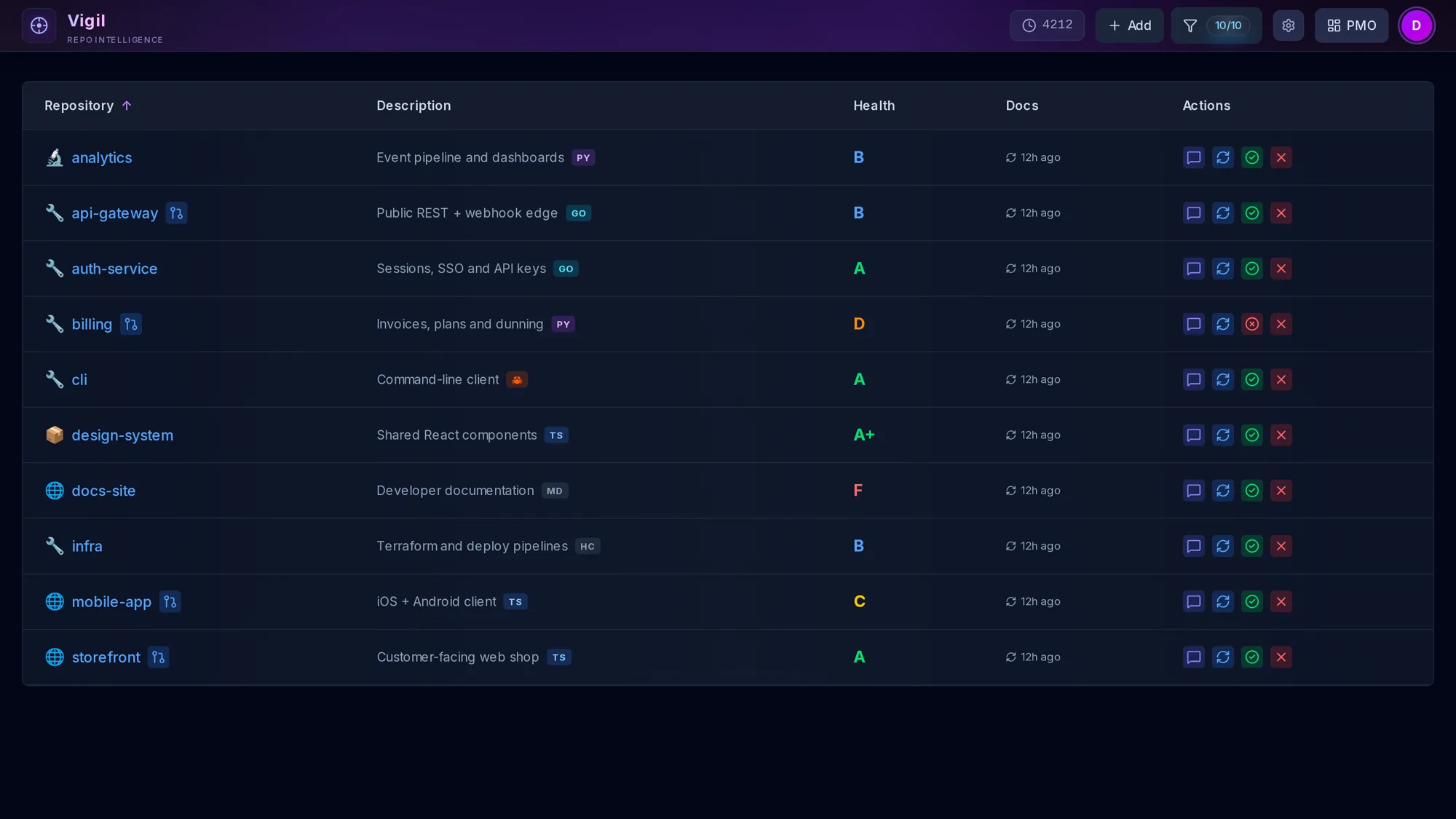
Inspect
Docs. Best practices. Community standards.
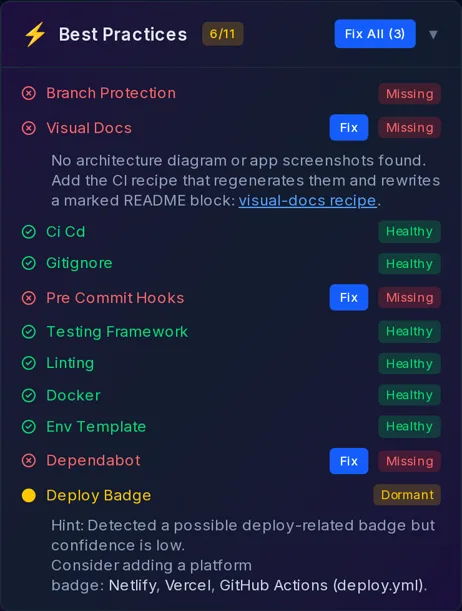
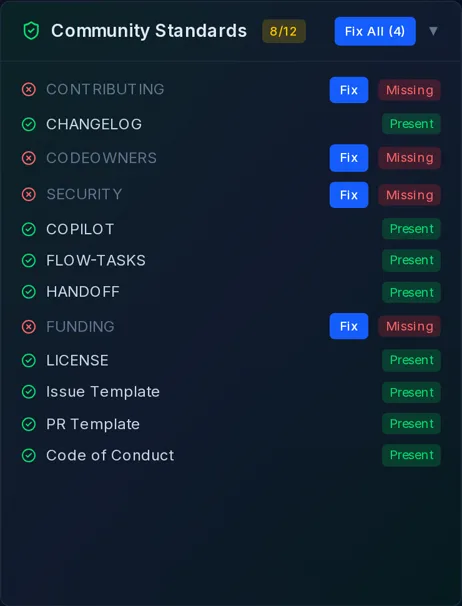
Open any repo to see what it has and what it's missing: core docs (README, ROADMAP, TASKS, FEATURES, METRICS), 11 best practices from CI and branch protection to Dependabot and pre-commit hooks, and 12 community standards including SECURITY, CODEOWNERS and agent prompt files.
- Present docs get an AI Improve button
- Dormant checks explain what's half-done, like a deploy badge it isn't sure about
- Starter, Production and Enterprise profiles weight what matters
Fix
One click. One pull request.
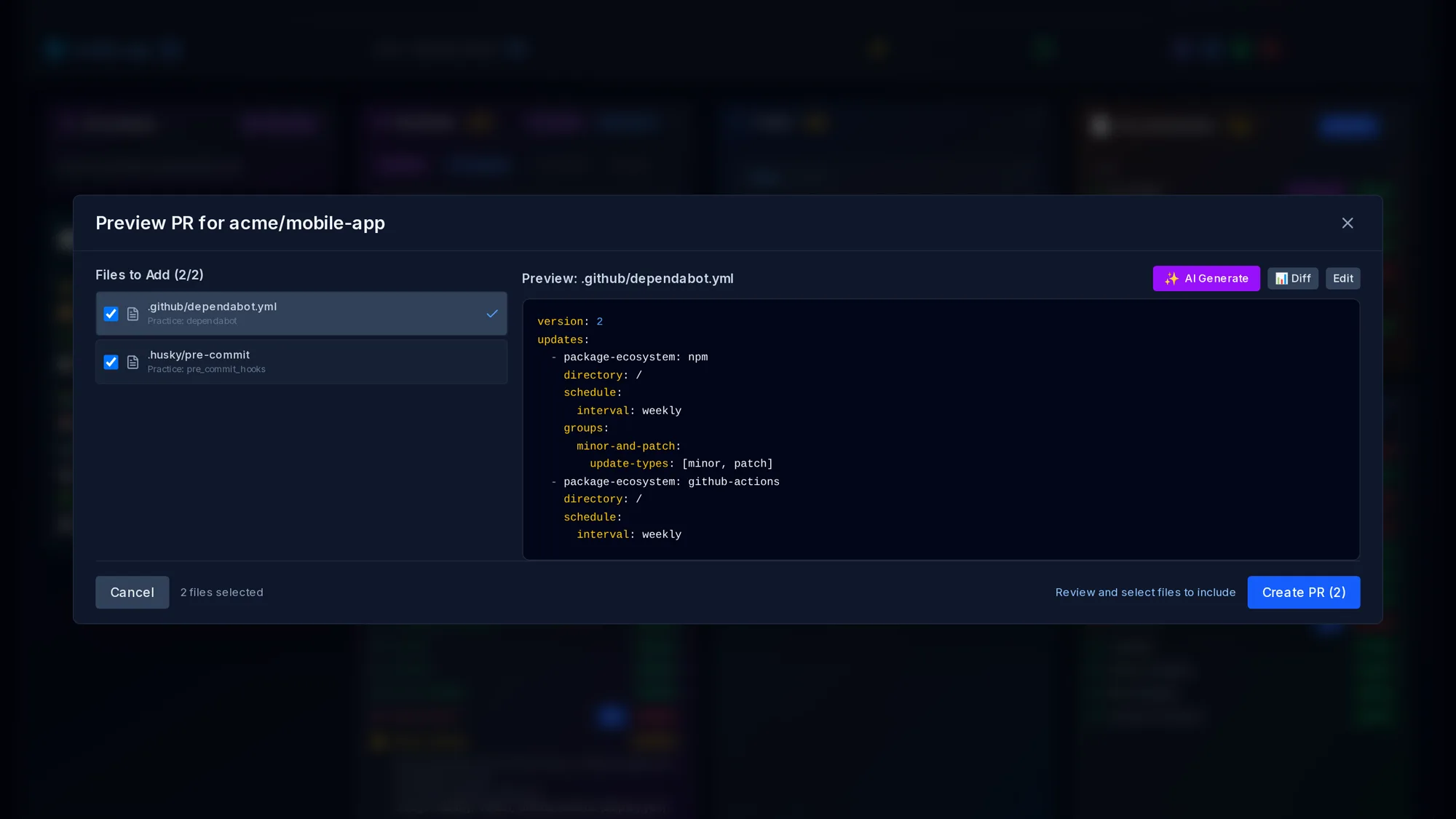
Fix All gathers a template for every missing, fixable item and opens a preview. Check the files you want, edit them or let AI tailor them to the repo, then Create PR. Vigil never pushes to your default branch.
Visual best practices
Screenshots, diagrams, spots. Kept current.
Vigil grades every repo's screenshots, diagrams, videos and Pages site. If CI alone can fix a row, one click opens a PR with the recipe and a HOWTO for the next agent. If it needs a skill run, the row shows the exact /promo command, the repo path and the inputs. It also checks whether Actions can open the bot PRs, and spots repos running nightly /journeys.
PMO
Open work. Most urgent first.
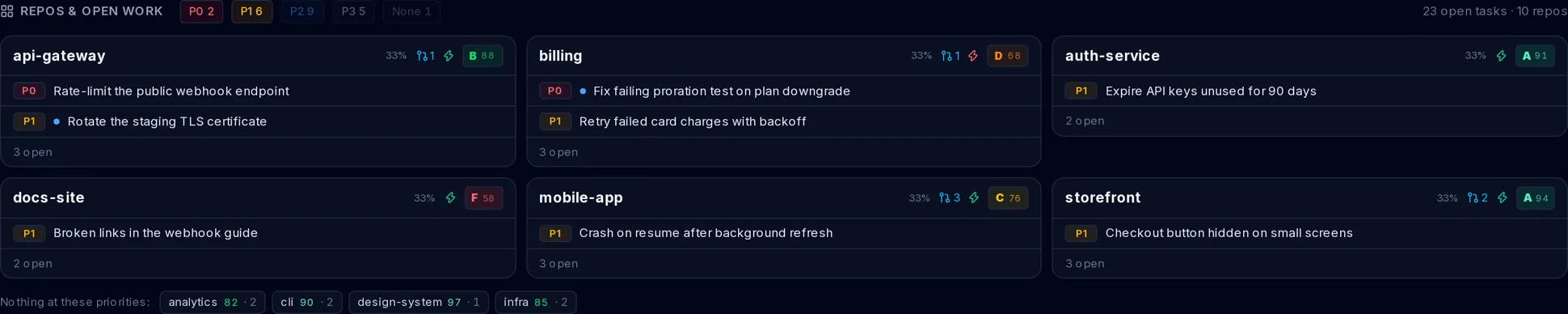
Every repo's TASKS.md is parsed on sync (priority, status, owner) and rolled into one grid. Each repo card lists its own open tasks, P0 first, and the cards are ordered by how urgent their work is. Repos with nothing at the selected priorities fold into one row.
Relationship map
Which repo uses which. And why.
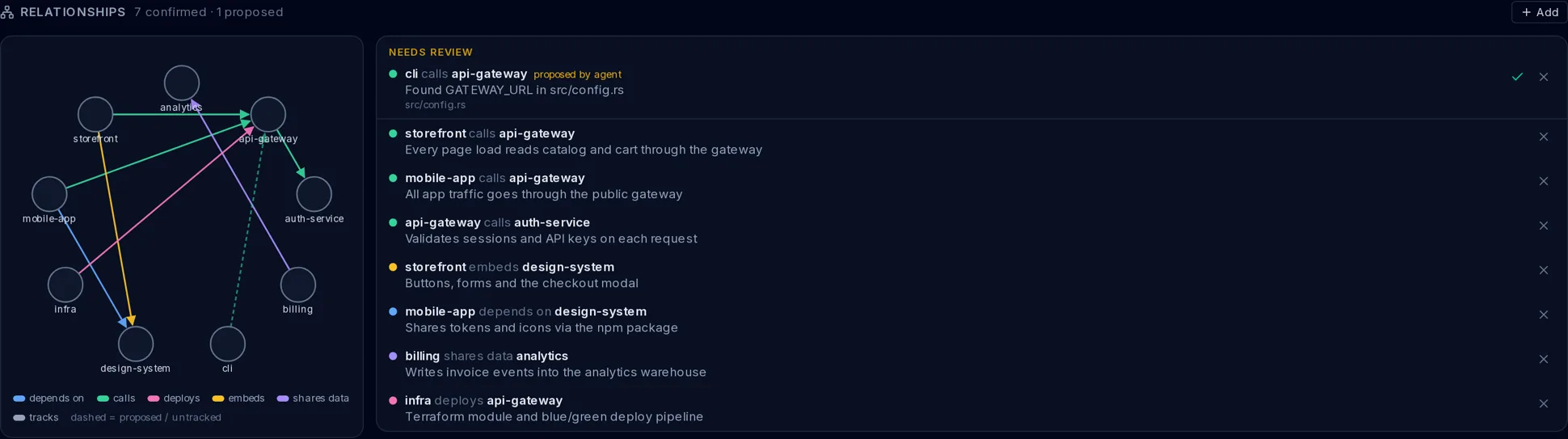
Directed edges with a kind (calls, depends_on, deploys, embeds, shares_data, tracks) and a line of context. You add and confirm them. Agents can propose one with evidence, and it waits for your review.
Chat
Ask a repo. Get a PR.
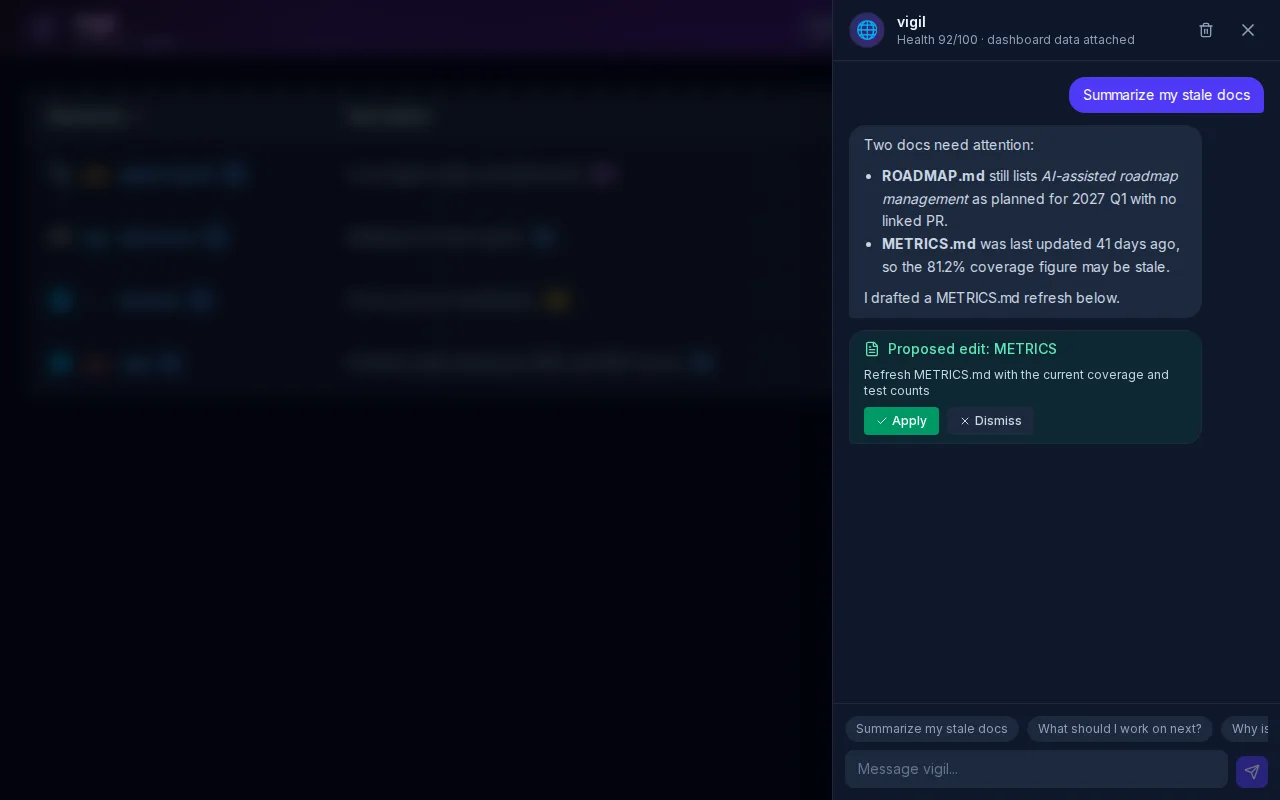
Every repo has its own chat thread, grounded in what Vigil synced: health, docs, tasks and roadmap. Ask what's stale or what to do next. When an answer calls for a doc edit, it comes back as a proposal you can apply, and applying it opens the usual preview-and-PR flow.
One feature at a time
Short cuts, one idea each.
Vertical, narrated cut for Shorts and Reels: health-17s-vert.mp4
Also in the box
Everything else you'll reach for.
Repo tiers
Tag each repo Critical, Important, Standard or Low from a badge beside its type icon. Filter the dashboard by tier, and agents can ask list_repos for just your T1s.
Chat with any repo
A chat thread per repo, grounded in its synced health, docs, tasks and roadmap. Ask what to do next; it can propose a doc edit or tick a task off, and each one lands as a PR you review.
AI that shows its work
Improve rewrites an existing doc and shows a before/after diff. Suggest drafts features and roadmap goals from the repo's own signals. Summaries on demand.
Your key, any provider
Gemini by default with automatic failover to OpenAI and Anthropic, per-provider circuit breakers, and bring-your-own-key, encrypted at rest.
Synced on push
A GitHub webhook re-syncs a repo seconds after each push. Every sync records a snapshot, so the health sparkline shows which way a repo is trending.
Docs that stay current
A CI recipe regenerates architecture diagrams and app screenshots into your README via a bot PR. Vigil detects it as a best practice across your repos.
Built for agents
Your agents read it too.
A JSON-RPC MCP server at /api/mcp works with claude mcp add over HTTP. GET /api/context returns the same portfolio as one LLM-ready JSON document. Filter by health, language, type, open vulnerabilities or tier.
- get_open_tasks
- get_relationships
- propose_relationship
- get_portfolio_overview
- list_repos
- get_repo_health
- get_repo_details
- list_tasks
- search_repos
- get_security_summary
> what should I work on next?
⏺ vigil · get_open_tasks (priority: P0, P1)
  8 open · P0 2 · P1 6
  P0  billing       Fix failing proration test on plan downgrade
  P0  api-gateway   Rate-limit the public webhook endpoint
  P1  api-gateway   Rotate the staging TLS certificate
  P1  billing       Retry failed card charges with backoff
Claude Code skill
Teach Claude how you work.
Drop skills/vigil/ into ~/.claude/skills/ and Claude knows when to reach for Vigil without being asked, and how to leave your repos in a shape Vigil can read.
- Which MCP tool answers which question, P0 first, T1 first
- Check
get_relationshipsbefore changing anything another repo calls - Close the
TASKS.mditem in the same PR that finishes it - The task, roadmap and feature formats the parsers expect
$ mkdir -p ~/.claude/skills/vigil
$ curl -fsSL \
https://raw.githubusercontent.com/nitsuah/vigil/main/skills/vigil/SKILL.md \
-o ~/.claude/skills/vigil/SKILL.md
$ curl -fsSL \
https://raw.githubusercontent.com/nitsuah/vigil/main/skills/vigil/reference.md \
-o ~/.claude/skills/vigil/reference.mdRun your own.
Needs Node 22, a GitHub OAuth app and a free Neon Postgres database. Fill in .env.local from .env.example, then open http://localhost:3000.
$ git clone https://github.com/nitsuah/vigil.git
$ cd vigil
$ npm install
$ cp .env.example .env.local # GitHub OAuth + DATABASE_URL + MCP_API_KEY
$ npm run setup-db
$ npm run devThen connect Claude Code to your deployment, and add the Vigil skill:
$ claude mcp add --transport http --scope user vigil \
https://YOUR-VIGIL-HOST/api/mcp \
--header "Authorization: Bearer $VIGIL_MCP_KEY"Signed out, the live dashboard shows a public default set of repos.